11.10.1 - Design and Implement a VLSM Addressing Scheme
Komplette Lösung: https://itexamanswers.net/11-10-1-packet-tracer-design-and-implement-a-vlsm-addressing-scheme-instructions-answer.html
Szenario 1
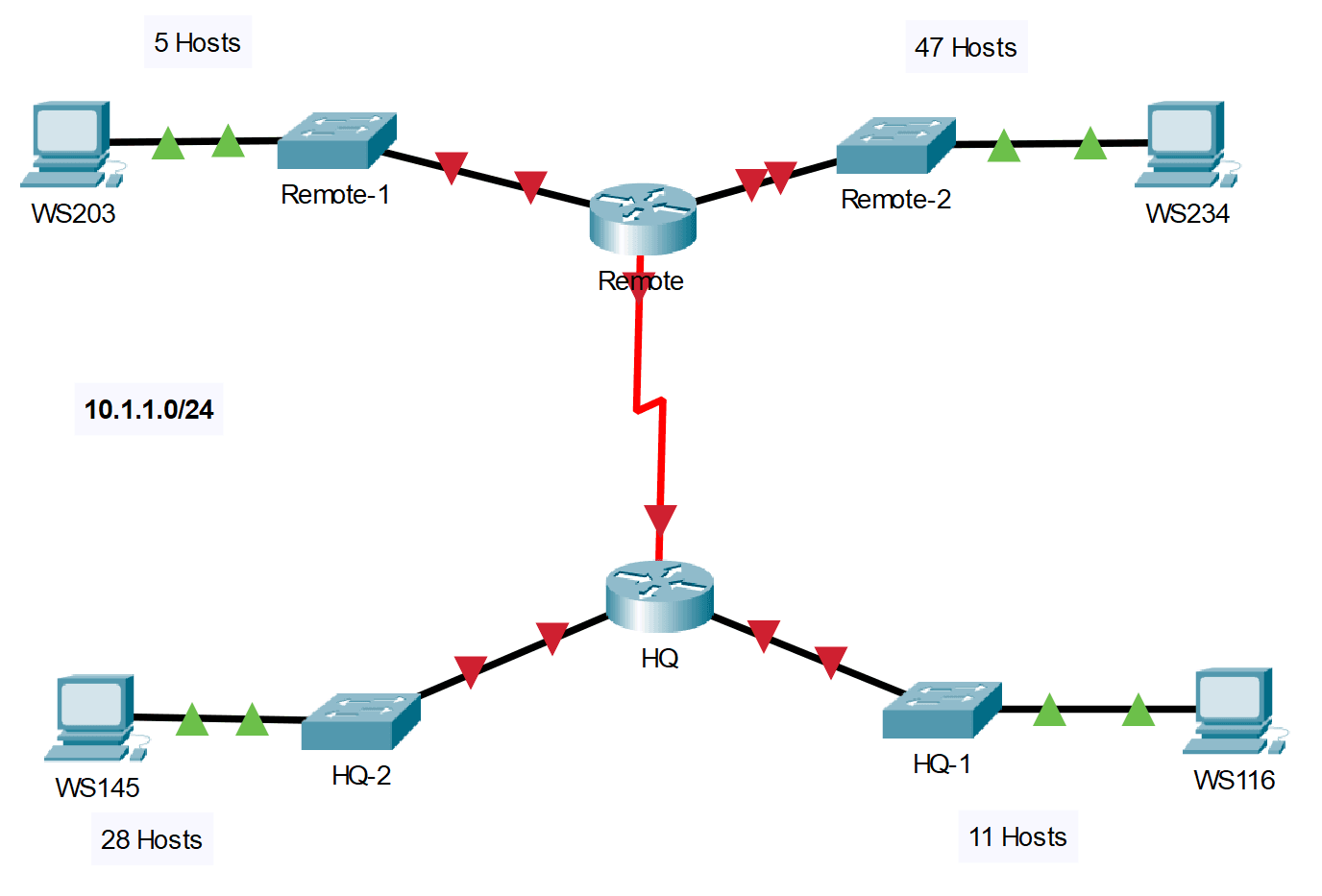
Zielsetzung:
In this lab you will design a VLSM addressing scheme given a network address and host requirements. You will configure addressing on routers, switches, and network hosts.
- Design a VLSM IP addressing scheme given requirements.
- Configure addressing on network devices and hosts.
- Verify IP connectivity.
- Troubleshoot connectivity issues as required.
Requirements
Host Requirements:
| LAN | Number of Addresses Required |
|---|---|
| HQ-1 LAN | 11 |
| HQ-2 LAN | 28 |
| Remote-1 LAN | 5 |
| Remote-2 LAN | 47 |
Design Requirements:
- Create the addressing design. Follow guidelines provided in the curriculum regarding the order of the subnets.
- The subnets should be contiguous. There should be no unused address space between subnets.
- Provide the most efficient subnet possible for the point-to-point link between the routers.
- Assign the subnets in the order of the number of hosts from the greatest to the least.
- Document your design in a table such as the one below.
| Subnet Description | Number of Hosts Needed | Network Address (CIDR) | First Usable Host Address | Broadcast Address |
|---|---|---|---|---|
| Remote-2 LAN | 47 | 10.1.1.0/26 | 10.1.1.1 | 10.1.1.63 |
| HQ-2 LAN | 28 | 10.1.1.64/27 | 10.1.1.65 | 10.1.1.95 |
| HQ-1 LAN | 11 | 10.1.1.96/28 | 10.1.1.97 | 10.1.1.111 |
| Remote-1 LAN | 5 | 10.1.1.112/29 | 10.1.1.113 | 10.1.1.119 |
| WAN Link | 2 | 10.1.48.120/30 | 10.1.1.121 | 10.1.1.123 |
Configuration Requirements:
Note: You will configure addressing on all devices and hosts in the network.
- Assign the first usable IP addresses in the appropriate subnets to HQ for the two LAN links and the WAN link.
- Assign the first usable IP addresses in the appropriate subnets to Remote for the two LANs links. Assign the last usable IP address for the WAN link.
- Assign the second usable IP addresses in the appropriate subnets to the switches.
- The switch management interface should be reachable from hosts on all of the LANs.
- Assign the last usable IP addresses in the appropriate subnets to the hosts.
Configuration
HQ
en
conf t
int g0/0
ip add 10.1.1.97 255.255.255.240
no shut
int g0/1
ip add 10.1.1.65 255.255.255.224
no shut
int s0/0/0
ip add 10.1.1.121 255.255.255.252
no shut
Remote
en
conf t
int g0/0
ip add 10.1.1.113 255.255.255.248
no shut
int g0/1
ip add 10.1.1.1 255.255.255.192
no shut
int s0/0/0
ip add 10.1.1.122 255.255.255.252
no shut
HQ-1
en
conf t
int vlan 1
ip add 10.1.1.98 255.255.255.240
no shut
ip def 10.1.1.97
HQ-2
en
conf t
int vlan 1
ip add 10.1.1.66 255.255.255.224
no shut
ip def 10.1.1.65
Remote-1
en
conf t
int vlan 1
ip add 10.1.1.114 255.255.255.248
no shut
ip def 10.1.1.113
Remote-2
en
conf t
int vlan 1
ip add 10.1.1.2 255.255.255.192
no shut
ip def 10.1.1.1
Hosts werden konfiguriert durch die IP-Konfiguration.
Last updated on